Start with what was actually agreed
Upload a statement of work, estimate, contract or approval email. AI proposes a baseline of deliverables and exclusions with source references. Your team reviews it, answers open questions and locks the agreement.
Turn the signed SOW into a locked baseline. Scope Guard flags work outside it, and the client approves the price before your team starts.
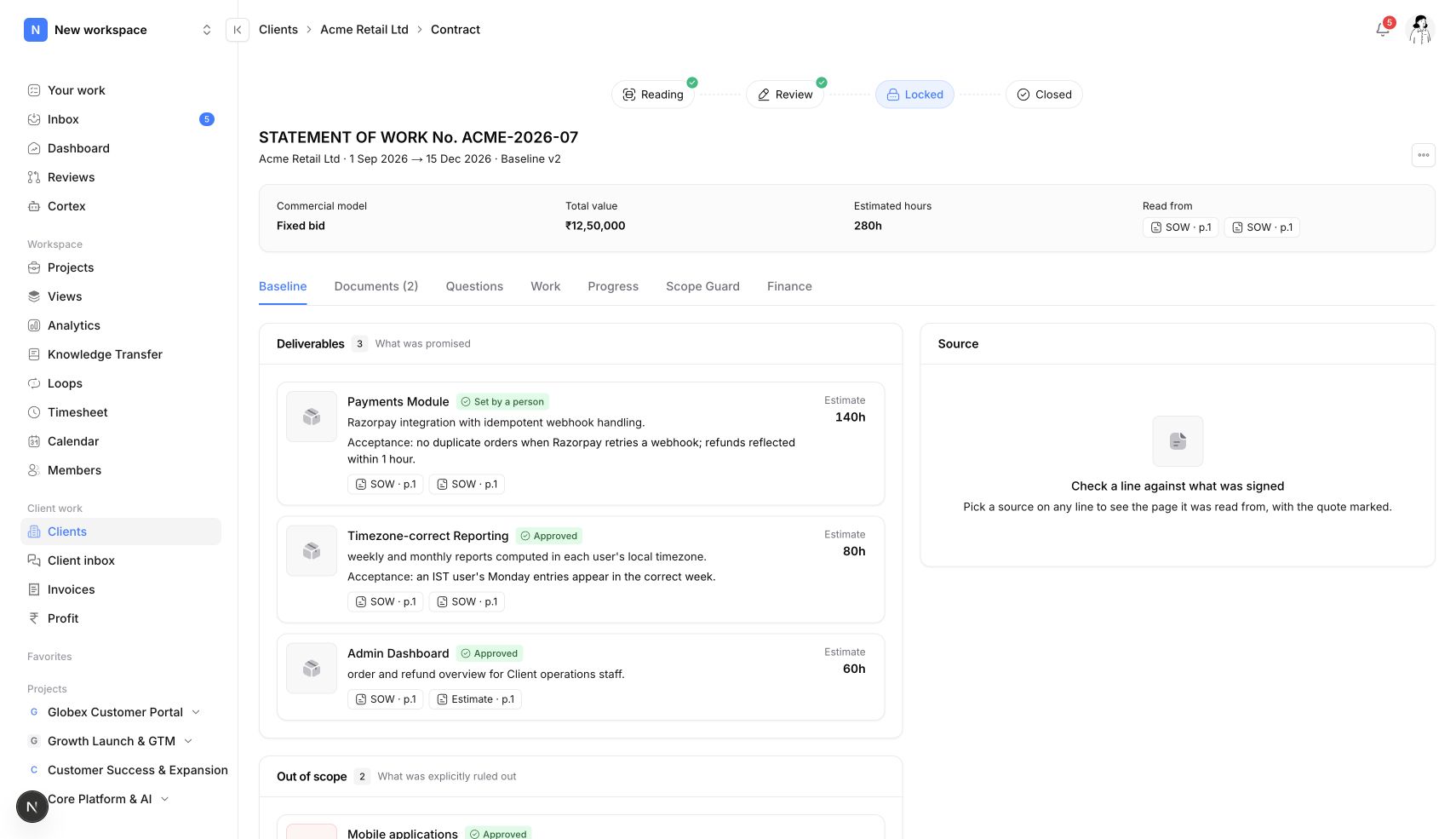
Upload a statement of work, estimate, contract or approval email. AI proposes a baseline of deliverables and exclusions with source references. Your team reviews it, answers open questions and locks the agreement.

Scope Guard scans work against the locked agreement and raises flags for review. The team decides whether to link work to scope, resolve the flag or raise a change request.
Create a change request that explains what changes and what it costs. Clients can approve or decline in the portal, keeping the commercial decision attached to the engagement.
Scope management capabilities
Everyone works from the same list of deliverables and exclusions, each linked to the page of the document it came from.
Extra work is caught while it is still a few hours, not at month-end when it has become a dispute.
Additional work becomes additional revenue, with the client's approval on record if the invoice is ever questioned.
One link for each client: progress, files, messages, change approvals and invoices. Clients sign in from an email link, with no password to remember.
How it works
01 — Upload the SOW as the source for the client engagement.
02 — Review the proposed baseline including deliverables and exclusions.
03 — Lock the agreement after your team has checked the proposal.
04 — Inspect Scope Guard flags and review work that may fall outside the baseline.
05 — Request client approval for a priced change to the agreement.
01
Open the source agreement beside the proposed scope to check what the client actually agreed.
02
Review deliverables, exclusions and unresolved questions before locking a baseline.
03
Lock the reviewed baseline so scope decisions refer to an agreed version.
04
Inspect the task and supporting context behind each potential scope difference.
No. AI proposes the baseline from your documents and flags tasks that may fall outside it. Your team reviews the sources, locks the baseline and decides every flag.
Turn on client work, create a client engagement and upload the SOW, estimate or approval email. Review the proposed baseline, lock it, and Scope Guard starts checking the work.
Yes. Clients approve or decline priced change requests in their portal, and the decision is stored on the engagement.
Client scope, change requests and Scope Guard are included in Basic and higher plans.
Connect the request, the agreement and the delivery.
Give clients one Neevio portal for progress, files, messages, change approvals and invoices they can pay online. Email-link sign-in.
Explore client portal →See project revenue, the cost of logged hours, budgets and unbilled work in Neevio, and fix a losing project while it is still running.
Explore profitability →A practical workflow for reviewing agreements, incoming requests and scope changes.
Explore project guide →Organize tasks, priorities, dependencies and project discussions in Neevio. Use list, board and timeline views to keep delivery moving.
Explore task management →Plan projects with epics, sprints, estimates and Gantt timelines in Neevio. Connect delivery plans to task ownership and dependencies.
Explore project planning →Review incoming project requests in Neevio. Accept, decline or mark duplicates before requests join your team’s planned work.
Explore intake →Track task time, review weekly timesheets and connect billable hours to invoicing and project costs in Neevio.
Explore time tracking →Create GST invoices from tracked hours in Neevio, with UPI details, Razorpay payments, reminders and a Tally export, connected to the project.
Explore invoicing →We use optional Google Analytics cookies to understand how you use Neevio. You can accept or reject these cookies and use the website either way. Your choice is saved for 180 days. Change it anytime in Cookie settings in the footer.