One queue for work that needs a decision
Keep requests separate from committed delivery. A queue and request detail pane make it easier to review context before accepting more work.
Review incoming work before it enters the plan. Accept, decline or link a duplicate with its context in view.
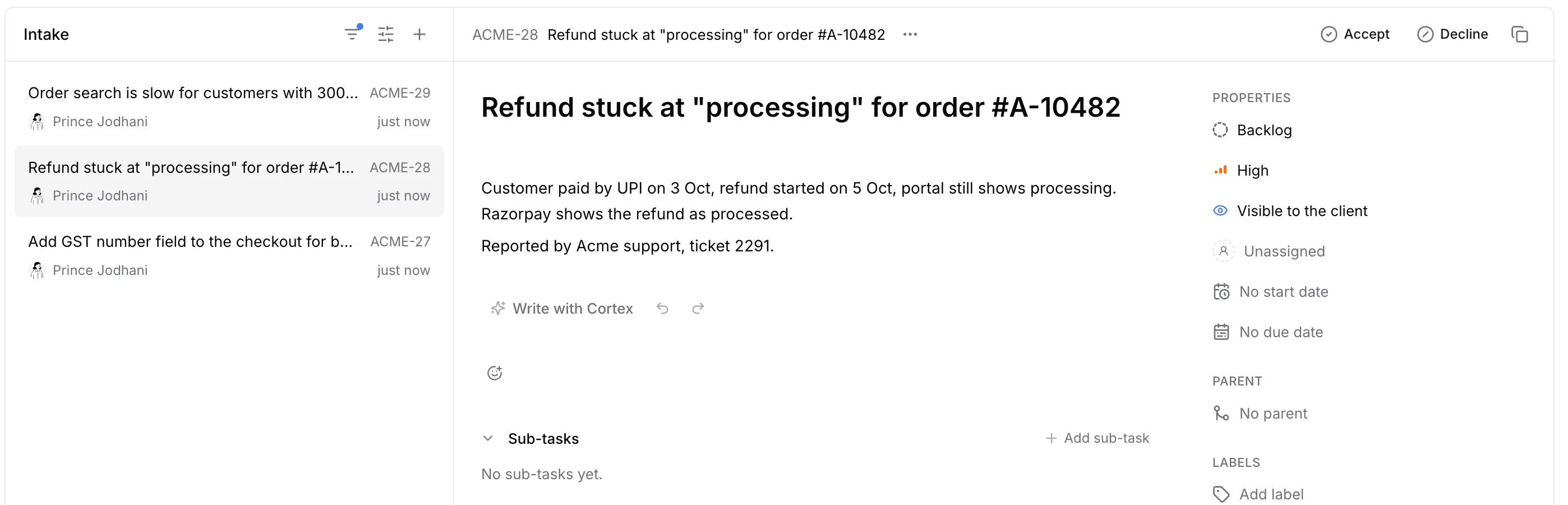
Keep requests separate from committed delivery. A queue and request detail pane make it easier to review context before accepting more work.
Accept useful work, decline requests that do not fit or link a duplicate to an existing task. The decision stays with the request.
A request can be valid and still fall outside the agreement. Use intake for prioritization and Scope Guard for reviewing client work against the locked baseline.
Intake capabilities
The planned week stays planned. Requests are reviewed in one place instead of interrupting whoever received them.
Every request ends with a recorded answer, so nobody asks twice and a duplicate never becomes a second task.
Priority and price stay separate decisions: intake decides whether the work is worth doing, Scope Guard decides who pays for it.
Assign tasks, set priorities and keep dependencies and discussions together. Give the team a clear next step.
How it works
01
Separate requests awaiting a decision from those your team has already reviewed.
02
Read the description and priority before deciding whether to accept the request.
03
Filter the queue and adjust its display to focus the review on relevant requests.
04
Record a clear acceptance or decline rather than letting every request become a task commitment.
No. Intake holds requests awaiting a decision. A backlog holds work the team has accepted for future planning.
Yes. Neevio lets you select the task a request duplicates.
No. Commercial changes are handled through client engagement change requests and approval.
Connect the request, the agreement and the delivery.
Organize tasks, priorities, dependencies and project discussions in Neevio. Use list, board and timeline views to keep delivery moving.
Explore task management →Lock the SOW as a scope baseline, flag work outside it with Scope Guard and send priced change requests for client approval in Neevio.
Explore scope management →Run agency delivery in Neevio: client requests, agreed scope, projects, time, invoices and profitability in one connected workspace.
Explore for agencies →Plan projects with epics, sprints, estimates and Gantt timelines in Neevio. Connect delivery plans to task ownership and dependencies.
Explore project planning →Give clients one Neevio portal for progress, files, messages, change approvals and invoices they can pay online. Email-link sign-in.
Explore client portal →Track task time, review weekly timesheets and connect billable hours to invoicing and project costs in Neevio.
Explore time tracking →Create GST invoices from tracked hours in Neevio, with UPI details, Razorpay payments, reminders and a Tally export, connected to the project.
Explore invoicing →See project revenue, the cost of logged hours, budgets and unbilled work in Neevio, and fix a losing project while it is still running.
Explore profitability →We use optional Google Analytics cookies to understand how you use Neevio. You can accept or reject these cookies and use the website either way. Your choice is saved for 180 days. Change it anytime in Cookie settings in the footer.